What is n8n? How it works, self-hosting and your first automations
n8n is an AI-ready automation platform you can self-host. Learn how it works, what it costs, what its licence allows and how to build your first workflows.
ReadAI automation (n8n)
We connect your tools — CRM, email, spreadsheets, store, accounting — into n8n workflows where AI reads, classifies and replies. You get hours back, not another app to babysit.
In short
n8n is a workflow automation platform where processes are built from connected nodes: a trigger (a new email or form), actions in your apps (CRM, Slack, spreadsheet, store) and AI steps (a language model that reads, summarises, classifies and writes). It can be self-hosted, so your data stays with you. We design, ship and maintain these automations — from simple alerts to multi-step processes with an AI agent.
Interactive workflow
Drag the nodes, switch scenarios and hit “Run workflow” to watch data flow between apps. We deploy each of these scenarios for clients.
Drag the nodes · click “Run”
Execution log
AI lead handling: Form → AI scores the lead → CRM → alert or auto-reply
Invoices from email: Email with PDF → AI extracts data → sheet & accounting → Slack summary
Blog → social media: New post → AI writes posts and a graphic → Slack approval → publishing
Support agent: WhatsApp message → AI agent with tools → reply or human hand-off
Our builds
Featured build
You enter the product data once, and an n8n workflow picks the category on each platform, writes the copy, prepares the images and creates the product in WooCommerce plus offers on Allegro and Erli. At the end you get one record with the result from every channel.
See how it works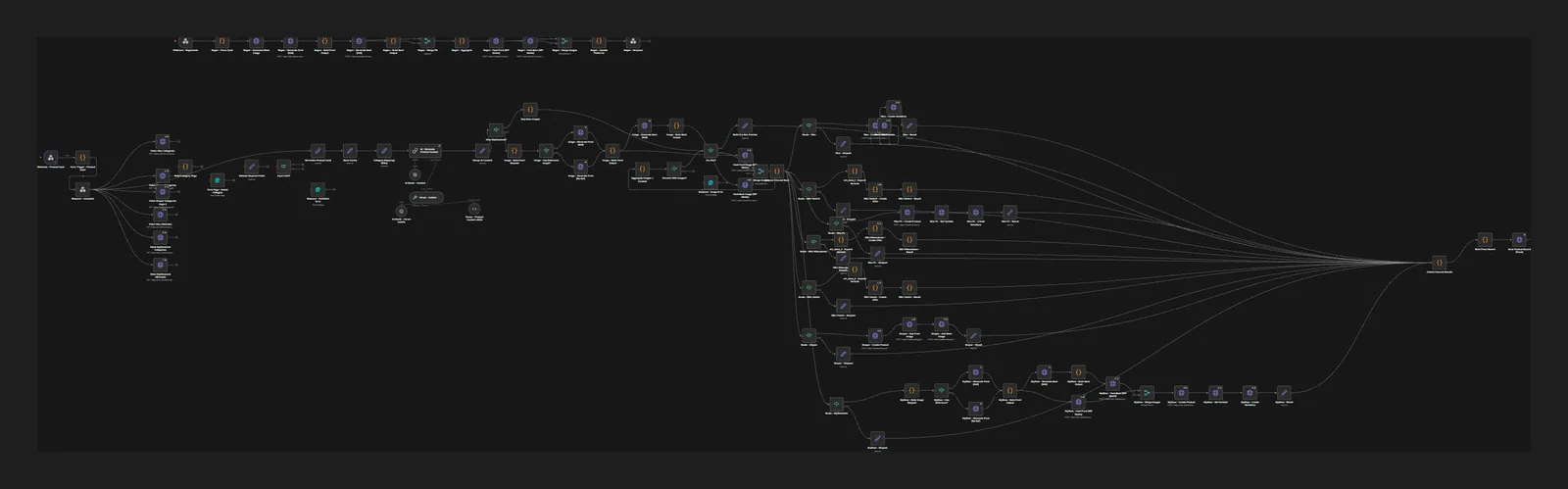
Who it’s for
Leads come in through forms, email and phone, and someone has to qualify them, log them in the CRM and reply before a competitor does. A workflow handles it the moment the enquiry arrives.
Orders, stock, returns, invoices and customer notifications. We connect WooCommerce with your wholesaler, accounting software and couriers, so nobody has to copy data from one system to another.
Documents from email, invoices from Poland’s KSeF e-invoicing system, payment reminders and weekly summaries. AI reads the data from PDFs, and a person only approves the cases that look questionable.
The bill climbs with every extra operation, and customer data passes through yet another third-party service. We move your automations to n8n, on your own server or in n8n Cloud.
Sound familiar?
Enquiries sit in the inbox until someone finds time to copy them into the CRM.
The workflow picks up each enquiry as soon as the form is sent: AI rates the topic and urgency, the contact lands in the CRM, and a salesperson gets a short Slack summary with a draft reply ready to go.
You type the same data into three places, and every so often something doesn’t match.
We set one source of truth and one path for the data: order, invoice, spreadsheet, CRM. The workflow validates everything along the way and sends an alert when the numbers stop adding up.
You already have automations, but nobody knows how they work, and you hear about failures from customers.
We review your existing scenarios, document them and add error handling and alerts. The ones worth moving go to n8n; the rest get tidied up where they are.
What you get
Retyping data, copying emails into the CRM, manual reports — a workflow does it all, error-free and with no holidays.
A language model classifies enquiries, extracts data from invoices and PDFs and drafts replies. Rules and control stay with you.
n8n can run on your own server (self-hosting). Customer data doesn’t have to travel through third-party tools.
Gmail, Google Sheets, Slack, HubSpot, Pipedrive, WooCommerce, Notion — plus any API via the HTTP node.
The most expensive automation is one that speeds up a broken process. So every n8n project starts with a conversation with the people who do the work today: where the data comes from, who retypes it, where mistakes creep in and how much time it eats in a normal week.
From that we draw a process map and pick the first one to three automations. We look at four things:
We also decide separately where AI is actually needed. If a rule like “over a set amount, send for approval” does the job, you don’t pay for a language model. AI comes in where the data is messy: the body of an email, a PDF attachment, notes from a call.
If you’d like ideas before we talk, browse our 15 practical AI automation examples for business, from lead handling to invoice processing.
A workflow that works in a demo is only half the job. The other half is everything nobody planned for: an API returns an error, a customer sends an invoice as a phone photo, the model replies in an unexpected format. Every automation we hand over comes with safeguards:
We keep AI costs in check too: a cheaper model for simple classification, a stronger one only where it earns its keep.
Once we’re done, nothing is locked away on our side. The workflows run on your n8n instance, the integrations are connected to your accounts, and the API keys for language models are yours, so you pay the AI provider directly.
We agree where n8n will run at the start:
We pick the language model to suit your data and budget: OpenAI, Claude, Gemini or a model running locally.
At handover you get documentation for every workflow (what triggers it, what it does, who gets alerted when it fails) and training for your team. If you ever want to develop the automations yourself or with someone else, you can: n8n workflows export as JSON files.
Want to understand the tool first? Read what n8n is and how self-hosting works, or our n8n vs Make vs Zapier comparison of pricing and limits. And when a process needs judgement rather than fixed rules, see how our AI agent implementation works.
Process
We talk to the people who do the work and map the process step by step. Then we pick the automations with the best ratio of time saved to effort.
We spell out triggers, inputs and outputs, AI steps and the points where a person decides. We gather system access and set up service accounts.
We build the workflows in n8n with error handling and test them on historical data from your business. We tune prompts and rules until the results are consistent.
The automation goes live, but for the first few days a person approves selected steps. We watch every run and deal with the edge cases that never showed up in testing.
We hand over documentation and train your team. If you like, we take on maintenance: n8n updates, monitoring and fixes when an API changes.
Engagement options
For companies that want to test automation on one process before going further.
For companies that want to connect several processes, such as sales, invoicing and reporting.
For companies where automation has become part of daily operations and simply has to keep running.
Scope of work
Tools & technology
Comparison
| Manual | n8n workflow with AI | |
|---|---|---|
| Response to a new enquiry | Whenever someone checks the inbox | As soon as the form is submitted |
| Retyping data | Typos, missing fields, duplicates | Data moved automatically and checked on the way |
| Evenings and weekends | Tasks wait until Monday | The workflow runs around the clock |
| More orders or leads | More hours or another hire | More executions, no extra headcount |
| Process knowledge | In one person’s head | Written into the workflow and its documentation |
| Audit trail | Hard to tell who changed what, and when | A history of every run in n8n |
| Judgement calls | A person, start to finish | A person, with AI preparing the data and a draft |
FAQ
n8n is an automation tool where processes are built visually from nodes connected into a workflow. It has hundreds of ready-made integrations, AI nodes and can run on your own server.
Zapier and Make are convenient to start with but get expensive at volume and don’t offer self-hosting. n8n is more flexible, allows custom code and keeps data in-house. We advise after reviewing your processes.
Repetitive, rule-based and frequent ones: handling form leads, extracting data from emails and invoices, order alerts, weekly reports, publishing to social media.
We design them with guardrails: AI prepares, a human approves where there’s risk. Sensitive data can be processed on your own server, and every execution is logged.
We can take over maintenance (n8n updates, monitoring, fixes when APIs change) or train your team and hand over documentation.
The number of processes and integrations, whether your systems have APIs, how many AI steps a workflow needs and what safeguards it requires (human approval, for example). Running costs are a server or an n8n Cloud subscription plus AI model usage, which you pay the provider for directly. We quote after the workshop, broken down by stage.
We usually launch the first automations 3–6 weeks after the workshop, including the supervised start. A single simple workflow can be ready sooner, while projects spanning many systems (ERP, accounting, several departments) are planned in stages.
A list of the tools you use, admin access or service accounts for those systems, and a dozen or so real examples of your data (emails, orders or invoices, anonymised if needed). We also need one person on your side who knows the process and can answer questions about the exceptions.
Every workflow has error handling, so you hear about a problem from an alert, not from a customer. Under a care plan we respond to alerts and update workflows when an external service changes its API. Without one, you still have the documentation and execution history, and you can ask us for fixes whenever you need them.
Insights

n8n is an AI-ready automation platform you can self-host. Learn how it works, what it costs, what its licence allows and how to build your first workflows.
Read
n8n, Make or Zapier? We compare pricing (checked November 2026), how each meters usage, AI agents and self-hosting to help you pick the right platform.
Read
15 practical AI automation examples for business: leads, invoices, reviews and customer service, with the n8n steps, the AI role and where humans decide.
ReadQuote
Quotes are free. Tell us what you want to achieve — we’ll come back with questions, first ideas and a plan.
Services
We use essential cookies and, with your consent, analytics (Google Analytics, Hotjar) and marketing cookies to understand how you use the site and improve it. Details in our privacy policy.
