
What is n8n? How it works, self-hosting and your first automations
n8n is an AI-ready automation platform you can self-host. Learn how it works, what it costs, what its licence allows and how to build your first workflows.
Readn8n automation
Every hour, an n8n workflow takes the next offers from a sheet, pulls their data and category parameters from the Allegro API, and AI writes a new title and description. Changes reach Allegro only after validation, and every offer is backed up first.
In short
Automated Allegro listing optimisation is an n8n workflow that uses AI to rewrite offer titles and descriptions, working from data Allegro already holds: the offer’s parameters, its category and the fields that category requires. It’s built for sellers with dozens or hundreds of offers whose titles were written over the years, in a hurry and to different patterns. You choose in a sheet which offers to improve, and the workflow pulls their data through the Allegro API, generates a new version, checks it and writes it back. Before it changes anything, it backs up your offers, so the previous version is always to hand.
Workflow
A simplified, interactive version of our workflow. Drag the nodes and run it to watch the data flow.
Drag the nodes · click “Run”
Execution log
Allegro listing optimisation: Offer backup → sheet queue → Allegro API data → AI writes title and description → validation → PATCH to Allegro → report
Screenshot from the build
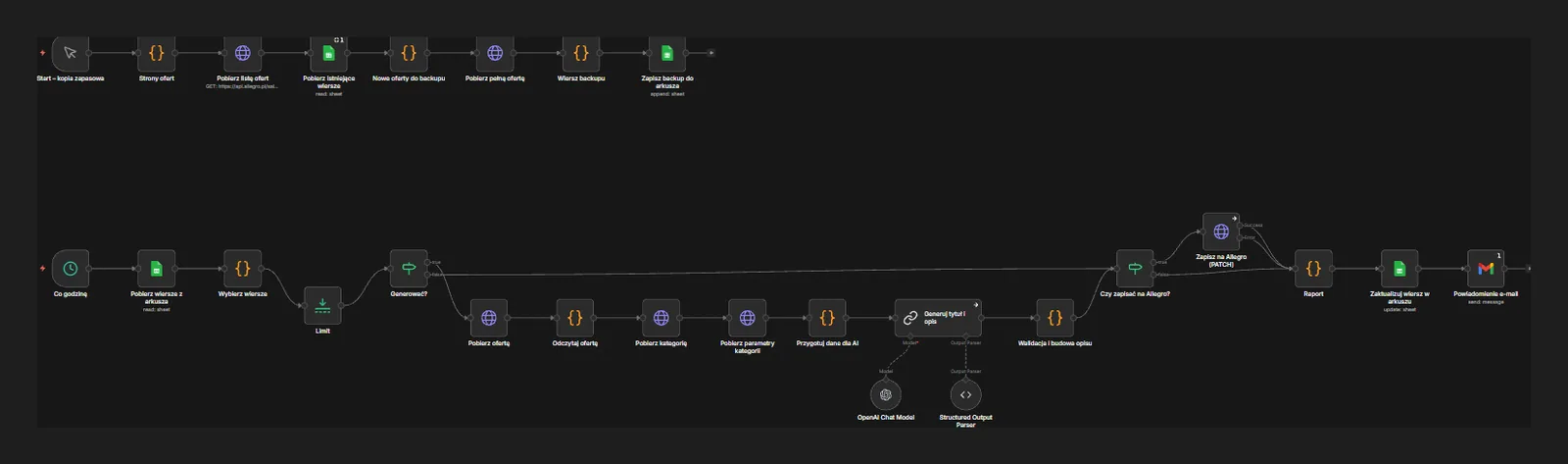
A real, unedited screenshot from the n8n editor. The interactive version above is simplified; here you can see every node, branch and error path.
Sound familiar?
Your titles were written over years, and no two follow the same pattern.
AI writes titles to a single pattern, using the key attributes from the offer’s parameters: brand, model, size, material. Code enforces the character limit and rejects any version that goes over.
Editing descriptions by hand means hours of clicking in the seller panel.
The workflow processes offers in batches every hour without you. You tick in a sheet what to improve and review the finished changes in a report.
You worry AI will break offers that sell well today.
Before it starts, the workflow saves a backup of your offers to a sheet. Every new version is validated, and you switch on writing to Allegro per offer or per batch.
How it works
A separate, manually started branch pages through your offers in the Allegro API, fetches full data for every offer not yet backed up and saves it to a sheet.
Every hour the workflow reads the sheet and picks rows marked for improvement. A Limit node sets how many offers go through per run.
For each offer it fetches the full content, the category and that category’s parameter list. A Code node turns it into a compact data package for the model.
An LLM Chain with an OpenAI model writes the title and description to your guidelines. A Structured Output Parser returns them in a fixed format, ready for checks.
Code checks the title length, required elements and banned phrases, then assembles the description into the section structure Allegro accepts.
If the row is approved for saving, an HTTP Request sends the change to the Allegro API with PATCH. Without approval, the new version waits in the sheet as a proposal.
The sheet row gets a status, the new version and any error message. Gmail sends a summary of the run.
On Allegro, the Polish marketplace, the offer title does a lot of the selling: it’s how both shoppers and the site’s search work out what you’re offering. With a large catalogue, though, titles and descriptions get written in different years, by different people, to different rules. This workflow tidies them up in batches, without pausing sales or clicking through the seller panel.
API data, not guesswork. The AI gets more than the current title: it also sees the offer’s parameters and the category’s parameter list, including required fields. So each new title is built from facts about the offer. The prompt explicitly tells the model not to add features that aren’t in the data, and validation rejects titles missing key elements such as brand or model.
Safe changes. Before anything is overwritten, the backup branch saves full offer data to a sheet. A column in the sheet decides whether the workflow only prepares a proposal or writes it straight to Allegro. We usually start in proposal mode: you review the new titles, we refine the prompt, and you switch on saving for later batches once you’re happy with the results.
Errors and limits. The workflow works in small batches to stay clear of API limits, and a single failure doesn’t stop the run. If Allegro rejects a change, say because of a disallowed element in the description or a title that’s too long, the reason goes into the sheet and the email report. We connect to the API with OAuth on your seller account, and the credentials sit in n8n’s encrypted store.
The same approach works for new products: see automated product listing on WooCommerce, Allegro and Erli. If you also sell through your own store, read our WooCommerce vs Shopify comparison, and for the tool itself, what n8n is.
FAQ
It can, if changes go out unchecked, which is why the workflow has a backup, validation and a proposal mode. It’s best to start with a smaller batch, compare sales against the previous period and only then widen the scope. We don’t promise uplifts: the title is one factor among many, alongside price, photos and reviews.
Yes. Allegro offers sellers a REST API that covers reading and editing offers, categories and parameters. You need an app registered in its developer portal and authorisation for your seller account, which we set up during the project.
An Allegro description is made of sections containing text and images. The workflow can keep your existing images and replace only the text, or rebuild the sections from a template. We pick the approach during setup using examples of your offers.
As many as you set in the Limit node. We tune the pace to your catalogue size, the API limits and how many changes you want to review. At the start people usually pick small batches so they can judge the quality calmly.
Yes. The backup sheet holds offer data from before the changes, so the previous title and description can be restored. If you like, we add a separate workflow that restores whichever offers you tick in the sheet.
Insights

n8n is an AI-ready automation platform you can self-host. Learn how it works, what it costs, what its licence allows and how to build your first workflows.
Read
15 practical AI automation examples for business: leads, invoices, reviews and customer service, with the n8n steps, the AI role and where humans decide.
Read
WooCommerce vs Shopify compared: real costs, transaction fees, SEO, local payments and shipping in Poland, plus when a custom or headless shop makes sense.
ReadGet a quote
Describe your process and the tools you use. We reply within one business day with an implementation plan.
Other builds
We use essential cookies and, with your consent, analytics (Google Analytics, Hotjar) and marketing cookies to understand how you use the site and improve it. Details in our privacy policy.