
WooCommerce vs Shopify: An Honest Comparison (and When to Go Custom)
WooCommerce vs Shopify compared: real costs, transaction fees, SEO, local payments and shipping in Poland, plus when a custom or headless shop makes sense.
Readn8n automation
You enter the product data once, and an n8n workflow picks the category on each platform, writes the copy, prepares the images and creates the product in WooCommerce plus offers on Allegro and Erli. At the end you get one record with the result from every channel.
In short
Automated product listing on WooCommerce, Allegro and Erli is an n8n workflow that turns a single product submission into three ready listings: a product in your own store and offers on two Polish marketplaces. The data arrives through a webhook, for example from a form, a sheet or your inventory system, and the workflow fetches each platform’s categories and required attributes, uses AI to pick the category, writes the copy and prepares the images. It’s built for stores selling across several channels that today type the same product in three times, in three different panels. Each channel gets the data in its own format, and you get one record with the outcome.
Workflow
A simplified, interactive version of our workflow. Drag the nodes and run it to watch the data flow.
Drag the nodes · click “Run”
Execution log
Product → 3 channels: Product webhook → platform categories → AI picks the category and writes the copy → images → WooCommerce, Erli and Allegro
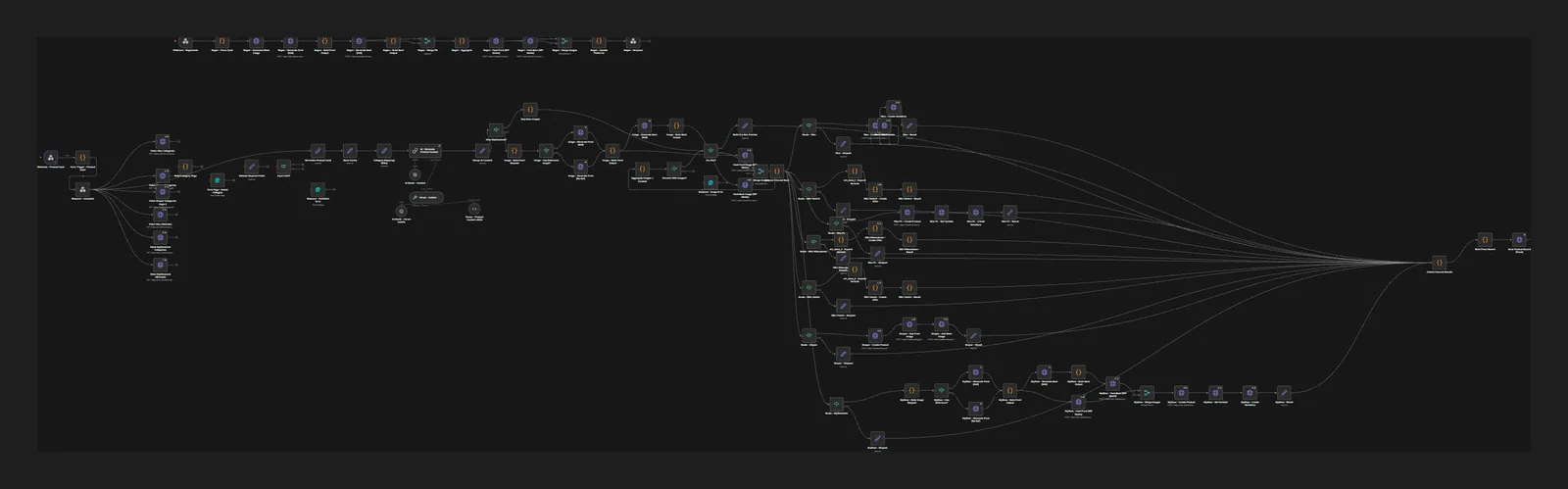
Screenshot from the build
A real, unedited screenshot from the n8n editor. The interactive version above is simplified; here you can see every node, branch and error path.
Sound familiar?
You enter the same product three times, in three panels.
You provide the data once. The workflow normalises it into a shared format, then maps it separately onto WooCommerce, Allegro and Erli fields, including variations in your store.
Every platform has different categories and different required fields.
The workflow pulls categories and attributes from each platform and builds maps from them, and AI picks the best-fitting category. Before anything is listed, validation checks that every required field is there.
Copy and photos are missing, so new products sit waiting to be listed.
A language model writes the name, description and attributes, and an image model prepares front and back shots, including from a reference photo. If the images fail the check, the product goes no further.
How it works
The data hits a webhook, code parses it and the sender gets an immediate “accepted” response. Everything else happens in the background.
The workflow fetches categories and attributes from WooCommerce, Erli and Allegro in parallel and builds the maps the AI works from.
The model matches the product to a category on each platform. Validation checks the required fields, and an incomplete product stops with a list of what’s missing.
The data is normalised, and an LLM with an output parser writes the name, description and attributes in a fixed format that every channel draws on.
The workflow builds a prompt, checks for a reference photo and generates front and back shots. The images are gathered and checked before the product moves on.
A router sends the product to WooCommerce with its variations, and the offers to Erli and Allegro, each in that platform’s format.
Results from every channel (IDs, links, errors) are collected into one record that goes to your system or sheet. A separate webhook lets you regenerate just the images.
Selling across several channels makes sense until adding a product starts taking longer than selling it. Every platform has its own category tree, its own required parameters and its own description format. This workflow takes over the job of translating one product into three formats, and all you supply is the source data.
Categories from real lists. The workflow fetches current categories and attributes from the platforms and builds maps from them. AI chooses a category from a list that actually exists, so it can’t invent names. Validation then checks the required fields for the chosen category. If something is missing, such as material or size, the product goes to no channel at all and the record lists the gaps.
Copy and images under control. The language model works with an output parser, so it returns the name, description and attributes in a fixed structure. Images are generated from a prompt built on the product data, and when you have a reference photo the model uses it as the starting point. A listing photo should show the actual product faithfully, so during setup we agree when the workflow generates shots and when it sticks to your own photos. If a result misses, a separate webhook regenerates the images without relisting the product from scratch.
Every channel’s result in one place. At the end the workflow gathers the responses from WooCommerce, Erli and Allegro: IDs, links or error messages. If one channel rejects an offer, the others aren’t held up, and the record shows exactly where the data needs fixing. To begin with, you can also list products as drafts where the platform allows it and review them before they go live.
Once your offers are live on Allegro, you can refine them with automated Allegro listing optimisation, and translate your store with AI WooCommerce product translation. Still choosing a platform? Read our WooCommerce vs Shopify comparison or see how we build online stores.
FAQ
No. All you need is a source that can send data to a webhook: a form, a sheet with a button, an inventory system or a PIM. We agree a shared data format, and the workflow maps it onto each platform.
The AI can only choose from categories fetched from the platform, and validation checks the required fields. During setup we test the matching on your range and add fixed rules for product groups where the category is obvious. You can also switch on approval before publishing.
A listing photo should show the product you’re actually selling, so generation makes most sense when the model works from your reference photo. During setup we agree when the workflow creates shots and when it only uses your own photos.
In WooCommerce the workflow creates the product together with its variations. Marketplaces handle variants differently, so we fit that part to Allegro’s and Erli’s rules during setup, using examples from your range.
This workflow lists new products. We build stock and price sync between channels as a separate automation, because it runs on a different rhythm and carries different risks.
Insights
WooCommerce vs Shopify compared: real costs, transaction fees, SEO, local payments and shipping in Poland, plus when a custom or headless shop makes sense.
Read
15 practical AI automation examples for business: leads, invoices, reviews and customer service, with the n8n steps, the AI role and where humans decide.
Read
n8n is an AI-ready automation platform you can self-host. Learn how it works, what it costs, what its licence allows and how to build your first workflows.
ReadGet a quote
Describe your process and the tools you use. We reply within one business day with an implementation plan.
Other builds
We use essential cookies and, with your consent, analytics (Google Analytics, Hotjar) and marketing cookies to understand how you use the site and improve it. Details in our privacy policy.