
AI agents for business: how they differ from chatbots and how to deploy
What an AI agent is, how it differs from a chatbot or automation, where it pays off, how to secure it (AI Act, GDPR) and how to deploy one step by step.
Readn8n automation
An n8n workflow reads your inbox, filters out spam and sends the emails that matter to Telegram. You record a voice note with your answer, AI turns it into a finished email, and one button sends, revises or discards it.
In short
An AI email assistant on Telegram is an n8n workflow that watches your inbox and lets you answer emails without opening your mail app. An OpenAI model classifies every new message, spam is dropped, and the emails that matter arrive in Telegram in a readable form. You reply with a voice note or text, AI turns it into a well-structured answer using what it knows about your business, and the finished draft comes back to you with buttons: send, revise, discard. It’s built for business owners, salespeople and specialists who spend much of the day away from their desk but can’t leave customer emails until the evening.
Workflow
A simplified, interactive version of our workflow. Drag the nodes and run it to watch the data flow.
Drag the nodes · click “Run”
Execution log
Email assistant on Telegram: New email → AI classifies and filters spam → Telegram alert → voice note → transcription → AI drafts the reply → approval → sent via SMTP
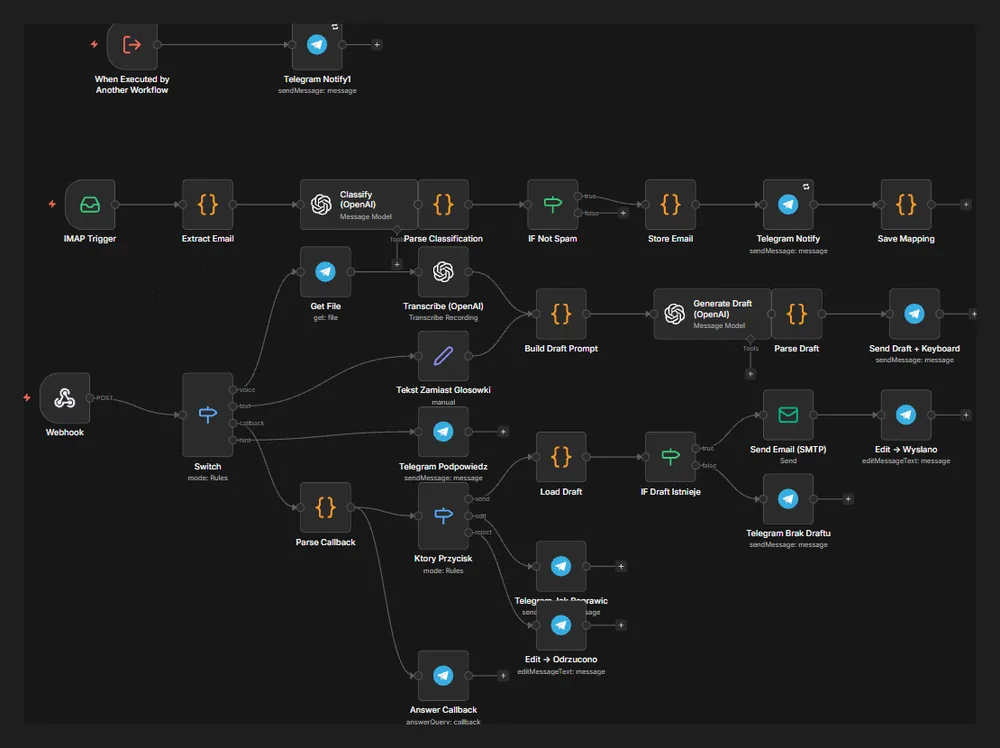
Screenshot from the build
A real, unedited screenshot from the n8n editor. The interactive version above is simplified; here you can see every node, branch and error path.
Sound familiar?
Important emails get buried under spam and everything else.
The model classifies every new message before you see it. Spam is dropped, and the email arrives in Telegram with sender, subject and body. You can add more categories, newsletters for example.
Typing a proper email reply on your phone is a pain.
You record a voice note, just as you’d brief an assistant. The workflow transcribes it, and AI writes a correct, polite email using the original message for context and your business information.
You worry the AI might send something without you knowing.
Nothing goes out until you tap “send”. The draft comes back to Telegram with buttons, and before sending the workflow checks that the draft still exists and belongs to the right email.
How it works
An Email Trigger (IMAP) picks up the new message, and code extracts the sender, subject and body.
An OpenAI model classifies the message, the result is parsed, and an IF node only lets through what isn’t spam.
The email is stored and a Telegram message with its content arrives. The workflow records which Telegram message belongs to which email.
A Telegram webhook receives your response, and a Switch works out whether it’s a voice note, text or a button tap.
The voice note is downloaded and transcribed by OpenAI. The prompt combines the transcript, the original email and your company knowledge base, and the model writes a draft reply.
The draft comes back to Telegram with three buttons: send, revise and discard.
“Send” loads the draft, checks it exists and sends the email over SMTP, and the Telegram message changes to “sent”. “Revise” asks what to change, and “discard” closes it without sending.
This assistant doesn’t answer for you; it shortens the path from “I need to reply to that” to a sent email. You decide what to say, and AI takes care of the form: the greeting, the order of points, the tone and the sign-off. It all happens in Telegram, which is on your phone anyway.
Business context in every reply. We attach a knowledge base to the prompt: your services, opening hours, standard answers, rules on deadlines and complaints. So a quick “tell them we can do next week and ask for the address” becomes a complete email with the right details. The prompt also tells the model not to add anything that isn’t in the knowledge base or in what you said.
A human approves every send. The draft always comes back to Telegram with buttons. Sending only starts once you tap “send”, and the workflow first checks that the draft exists and is linked to the right email. After sending, the Telegram message changes to “sent”, so you can see at a glance what’s done. “Revise” lets you add a note by voice or text, and “discard” closes the matter.
Access and data. We set the bot to respond only to your Telegram account, or to named people on your team. The mailbox connects over IMAP and SMTP, with credentials kept in n8n’s encrypted store, which you can run on your own server. Email content is sent to the AI model, so during setup we agree which mailboxes and types of message the assistant handles and which stay out of it.
Errors under control. If transcription or sending fails, you get a message about it in the same chat, and the email waits for another attempt instead of slipping through the cracks.
If you want the assistant to make more decisions on its own, such as booking meetings or checking orders, read how an AI agent differs from a chatbot and see how our AI agent implementation works. For more inbox ideas, browse our AI automation examples for business.
FAQ
No. Every draft comes back to you in Telegram and only goes out when you tap “send”. Before sending, the workflow also checks that the draft exists and is matched to the right email.
No. The voice note can be loose, with repetition and half-finished thoughts. Transcription turns it into text, and the model tidies the content and sets the tone. If something’s off, you tap “revise” and say what to change.
In the basic version it filters out spam. We agree the categories during setup: you can also skip newsletters and system notifications, or route invoices, say, to a separate workflow.
The content of the email and your voice note is processed through the model’s API to produce the classification, transcript and draft. You can run n8n on your own server, and we choose the model provider and which mailboxes are covered to suit your data requirements. For sensitive data we also look at a locally hosted model.
Yes. Each person can have their own chat with the bot and their own mailbox, or share a mailbox split by category. The bot only responds to accounts we allow.
Insights

What an AI agent is, how it differs from a chatbot or automation, where it pays off, how to secure it (AI Act, GDPR) and how to deploy one step by step.
Read
15 practical AI automation examples for business: leads, invoices, reviews and customer service, with the n8n steps, the AI role and where humans decide.
Read
n8n is an AI-ready automation platform you can self-host. Learn how it works, what it costs, what its licence allows and how to build your first workflows.
ReadGet a quote
Describe your process and the tools you use. We reply within one business day with an implementation plan.
Other builds
We use essential cookies and, with your consent, analytics (Google Analytics, Hotjar) and marketing cookies to understand how you use the site and improve it. Details in our privacy policy.