
Short-Form Video for Business: Edit Reels and TikToks That Sell
Short-form video for business: how to edit Reels, TikToks and Shorts that sell. Hooks, captions, sound, ideal length and the mistakes that kill your reach.
Readn8n automation
An n8n workflow takes an idea from the queue, writes the lyrics, generates a song with vocals, cover art and a video, then sends you a preview on Telegram. Nothing reaches YouTube until you approve it.
In short
Automated AI songs for YouTube is an n8n workflow that takes a track from idea to upload: it pulls a topic from a queue in a sheet, writes the lyrics, title, description and tags, generates a song with vocals, cover art and a video, and finally sends you a preview on Telegram. The video goes to YouTube only once you approve it, and to the channel you choose; our version handles four channels at once. It’s built for creators and companies running music channels who want to publish regularly without assembling every release by hand across several tools. You set the direction and guard the quality, and the automation handles the repetitive production.
Workflow
A simplified, interactive version of our workflow. Drag the nodes and run it to watch the data flow.
Drag the nodes · click “Run”
Execution log
AI songs → YouTube: Idea queue → AI writes lyrics and metadata → song, cover and video via fal.ai → Telegram approval → upload to one of your YouTube channels
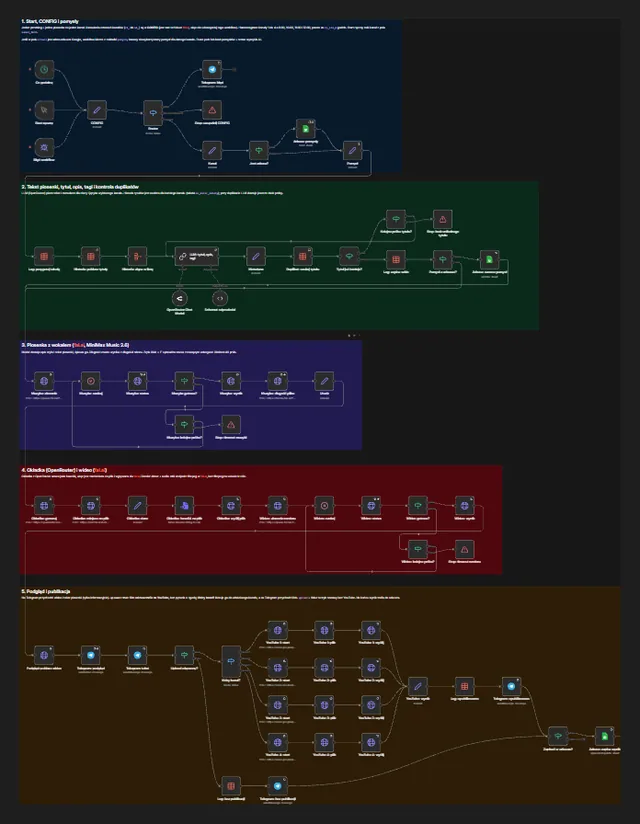
Screenshot from the build
A real, unedited screenshot from the n8n editor. The interactive version above is simplified; here you can see every node, branch and error path.
Sound familiar?
One track means several tools, downloading files and pasting descriptions around.
The workflow joins every stage into a single run: lyrics and metadata from a language model, music and video from fal.ai, cover art from an image model and the upload through the YouTube API. Files move between steps on their own.
AI can come up with the same title twice, or something you’d never publish.
Before any music is generated, the workflow checks the title against a table of past releases and asks the model for a new one if it’s a repeat. You watch every video in Telegram and decide yourself whether it goes ahead.
Music and video generation takes time, and external APIs sometimes fail.
Jobs go to fal.ai through a queue: the workflow waits, checks the status and fetches the result when it’s ready. Retries are capped, and every failure arrives as a Telegram alert instead of vanishing quietly.
How it works
The workflow runs hourly or on demand. A CONFIG node keeps the settings in one place (style, channels, retry limits), and a Router sends the run down the right path.
The next idea comes from the sheet: topic, mood, genre and target channel. If the queue is empty, the run ends without calling any paid API.
A model via OpenRouter writes the lyrics and metadata to a fixed JSON schema. The title is checked against a table of published tracks, and on a repeat the model tries again.
The lyrics and style brief go to the MiniMax Music model on fal.ai. The workflow submits the job, waits, polls the status and downloads the finished audio, stopping with an alert if it runs out of retries.
An image model via OpenRouter creates the cover, and fal.ai renders a video from it and the track. The same queue-and-poll pattern applies here.
The video arrives in Telegram with its title, description and buttons. A rejected release is logged and never appears on YouTube.
Once approved, a Switch picks one of the channels and the workflow uploads the video through the YouTube Data API. The link is saved to the sheet and you get a confirmation in Telegram.
A music channel lives on consistency, and consistency eats time: lyrics, recording, cover, render, description, tags, upload. This workflow strings those stages into a single n8n run, but leaves you the part that matters most: deciding whether a track should come out at all.
A queue, not a lottery. You keep ideas in a sheet: topic, mood, genre, channel. The workflow doesn’t invent your channel’s direction; it works through your list. A CONFIG node holds every setting, so changing the style, the model or the retry limit doesn’t mean editing a dozen nodes.
Long jobs without hanging. Music and video generation is asynchronous: fal.ai accepts a job and returns the result some time later. The workflow submits the request, waits, polls for the status and only downloads the file once it’s ready. Every loop has a retry cap, and when it’s hit the run ends with a message instead of hanging for hours. A separate Error Trigger posts every failed execution to Telegram.
A human before publishing. Nothing reaches YouTube without your tap. In Telegram you watch the finished video with its title and description, then approve or reject it. Rejected releases stay in the log, so there’s a record of what the model shouldn’t repeat.
Platform rules and rights. YouTube has policies on mass-produced, repetitive content and on labelling realistic AI-generated material, and music models come with their own licence terms. During setup we go through the terms of the models you pick with you and set up descriptions so they fit your channel’s rules from day one. Channel strategy and monetisation decisions stay with you; the automation takes the production off your plate.
If you also want to publish short-form clips, read how to edit short-form video that sells. For animation or channel branding, see our motion design and video service, and for the basics of the tool, what n8n is.
FAQ
Yes, within its rules. YouTube requires you to label realistic content made or altered with AI, and the YouTube Partner Program checks whether content is mass-produced or repetitive. That’s why the workflow relies on a varied idea queue and manual approval of every video. Always check the current rules in the YouTube Help Center.
That depends on the terms of the model and platform you use, and on the law where you are. Before setup we go through the terms of fal.ai and your chosen model with you, but that’s no substitute for legal advice if you plan, say, to distribute through streaming services.
Yes. We call the models through the fal.ai and OpenRouter APIs, and their settings live in the CONFIG node. Switching models usually means a new model ID and adjusted parameters, with no rebuild of the rest of the workflow.
The workflow keeps polling up to a set limit, then stops the run and sends an alert to Telegram. The idea can stay in the queue for another attempt. Nothing gets published half-finished.
In our version, yes: once approved, the video goes to the chosen channel and the link is saved to the sheet. You can also upload videos as private or scheduled and have them go live at set times.
Insights

Short-form video for business: how to edit Reels, TikToks and Shorts that sell. Hooks, captions, sound, ideal length and the mistakes that kill your reach.
Read
n8n is an AI-ready automation platform you can self-host. Learn how it works, what it costs, what its licence allows and how to build your first workflows.
Read
15 practical AI automation examples for business: leads, invoices, reviews and customer service, with the n8n steps, the AI role and where humans decide.
ReadGet a quote
Describe your process and the tools you use. We reply within one business day with an implementation plan.
Other builds
We use essential cookies and, with your consent, analytics (Google Analytics, Hotjar) and marketing cookies to understand how you use the site and improve it. Details in our privacy policy.