
WooCommerce vs Shopify: An Honest Comparison (and When to Go Custom)
WooCommerce vs Shopify compared: real costs, transaction fees, SEO, local payments and shipping in Poland, plus when a custom or headless shop makes sense.
Readn8n automation
An n8n workflow takes untranslated products from a queue, and AI translates their titles, descriptions, attributes and SEO meta into the languages you choose. Each result is checked for completeness and length before it reaches your store.
In short
Automated WooCommerce product translation with AI is an n8n workflow that prepares language versions of your products: the title, short and long description, attributes, meta title and meta description. It takes products to translate from a queue in a sheet or straight from WooCommerce, translates them in batches and saves them through the REST API in the way your multilingual plugin stores them. It’s built for stores entering new markets, or with hundreds of products, that don’t want to translate by hand or paste text from a translation tool into the admin panel. Every translation is checked for completeness and length, and everything goes into a log.
Workflow
A simplified, interactive version of our workflow. Drag the nodes and run it to watch the data flow.
Drag the nodes · click “Run”
Execution log
WooCommerce translation: Product queue → needs translating? → AI translates fields and SEO meta → completeness and length checks → saved to the store and logged
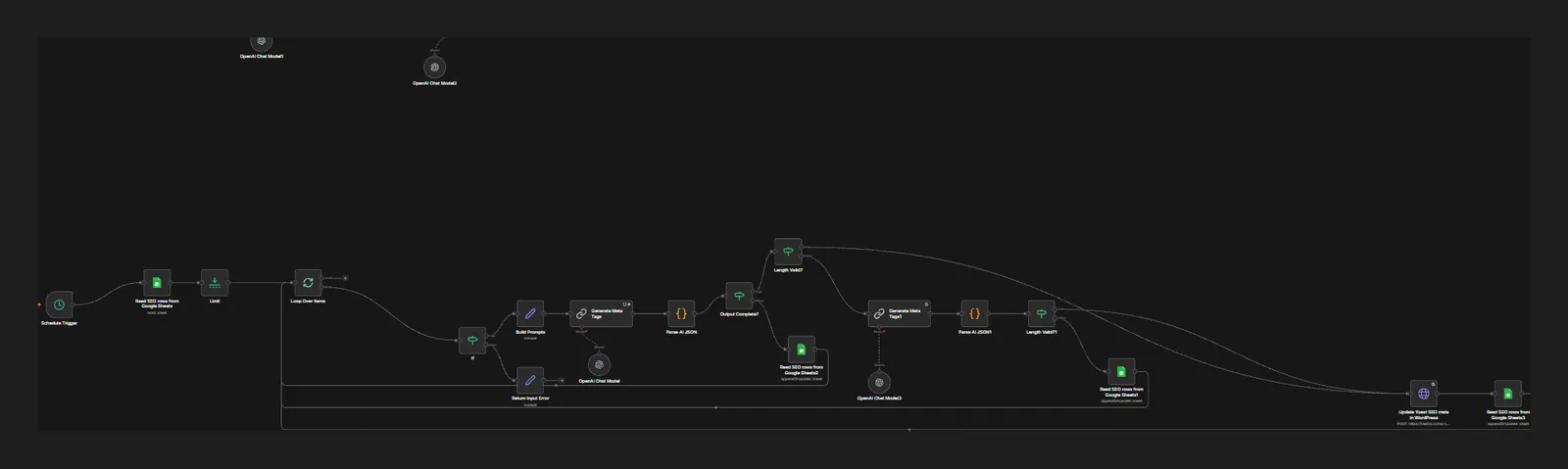
Screenshot from the build
A real, unedited screenshot from the n8n editor. The interactive version above is simplified; here you can see every node, branch and error path.
Sound familiar?
You copy descriptions into a translator and back again, one product at a time.
The workflow picks up the next products from the queue, translates every field in one model request and saves the result to your store. You get a log of what changed.
Machine translation mangles names, units and trade terms.
The prompt carries your rules: brand and model names stay as they are, units stay consistent and trade terms have agreed equivalents. The model returns JSON with every field kept separate, so nothing gets mixed up.
After translation, meta titles and descriptions come out too long or empty.
The workflow checks that every field is filled and that the meta fits your agreed limits. If not, it sends the model a second, narrower request instead of saving bad text.
How it works
A Schedule Trigger runs translations at set times, for example overnight when the store is quieter.
The workflow reads the queue from a sheet or a product list from the WooCommerce REST API. A Limit node sets the batch size and a loop handles products one by one.
An IF node skips products that already have a translation in that language, so you never pay for the same work twice.
Code builds the prompt from the product data and your rules, and an OpenAI model translates the title, descriptions, attributes and SEO meta in a single pass.
The response is parsed from JSON. One IF checks that all fields are present, another that the meta title and description fit the limits.
If something is off, the model gets a second request with a specific note, such as “shorten the meta description”.
The translation is saved to the store through the WooCommerce or WordPress REST API, and the sheet gets an entry: product, language, status and any error.
A language version of your store is more than translated descriptions. The attributes used in filters matter too, as does the meta data people see in search results. This workflow translates all of those fields at once, in one format, and saves them where your store expects to find them.
In step with your multilingual plugin. WooCommerce on its own doesn’t keep content in several languages. Plugins such as WPML or Polylang do, and each stores translations a little differently. During setup we check your configuration and set up saving through the REST API so the translation is linked to the original rather than created as a separate, unrelated product.
Checks without reading everything. The model returns JSON with separate fields. The workflow checks that none is empty and that the meta title and description fit the limits you set. If something fails, a second, narrower attempt follows. If that fails too, the product goes into the log with an error description and waits for a person, instead of landing in the store half-translated.
Glossary and brand voice. The prompt lists the words we never translate (brand, product lines, technology names), preferred equivalents for trade terms, and your tone. At the start you’ll usually review a sample from each category with someone who knows the language, and the feedback goes into the prompt before the workflow takes on the whole catalogue.
Safe for your store. The first runs are best done on a staging copy or a handful of products. The workflow only writes language versions and never touches the original, and its API access covers only what it needs.
If you add products across several channels, see automated product listing on WooCommerce, Allegro and Erli. We compare platforms in WooCommerce vs Shopify, and if the new language version needs to win traffic from Google, our SEO and GEO service can help.
FAQ
For most product descriptions AI gives you a solid base, especially with a refined prompt and a brand glossary. For legal or medical text, or your most important sales pages, we recommend a review by someone fluent in the language. The workflow can hold those products back for approval.
Ones that let you save translations through the REST API, such as WPML (with its WooCommerce Multilingual add-on) or a suitable edition of Polylang. Before going live we test your setup on a staging copy of the store.
Yes. The meta title and description are part of the same model request and get their own length check. How they’re saved depends on your SEO plugin, such as Yoast SEO or Rank Math, and we set that up during the project.
In the basic version, the product goes back into the queue when you flag it in the sheet. We can also add change detection so the workflow knows by itself which translations are out of date.
It depends on the number of products, description length, the number of languages and the model’s API limits. The workflow runs in batches in the background, so even a large catalogue goes through without blocking the store. We set the pace so you have time to review the first results.
Insights
WooCommerce vs Shopify compared: real costs, transaction fees, SEO, local payments and shipping in Poland, plus when a custom or headless shop makes sense.
Read
n8n is an AI-ready automation platform you can self-host. Learn how it works, what it costs, what its licence allows and how to build your first workflows.
Read
15 practical AI automation examples for business: leads, invoices, reviews and customer service, with the n8n steps, the AI role and where humans decide.
ReadGet a quote
Describe your process and the tools you use. We reply within one business day with an implementation plan.
Other builds
We use essential cookies and, with your consent, analytics (Google Analytics, Hotjar) and marketing cookies to understand how you use the site and improve it. Details in our privacy policy.